Odysseus AI
Comprehensive
Install & Setup Guide
This is a practical Odysseus AI installguide for people who want to run PewDiePie's self-hosted AI workspace without guessing which GitHub repo, Docker command, Windows script, macOS route, Ollama endpoint, admin login step, or safety setting matters.
We do not sell Odysseus AI itself. We provide independent setup resources, install tools, troubleshooting material, and Launch Kit early access for users who want fewer setup mistakes.
Quick Facts
Everything you should know before you install
Official Creator
Odysseus AI is created by developer PewDiePie. It is open source, licensed for modification, and available live to pull directly from the official GitHub repository. Start there before trusting commands from any tutorial, mirror, or copied ZIP.
No Single Binary
An Odysseus AI install is a route, not a single package download. It coordinates source code, environment files, web services, model engines, and provider settings, so success means the interface opens and a model provider can answer.
Dual Route options
You can run natively through Git, Python, and PowerShell or choose the contained Docker Compose structure. Docker is easier to repeat; native installs can be better when hardware acceleration or local shell control matters.
Ollama Connection
After building Odysseus, connect it to a model provider such as Ollama or a cloud API. Native Odysseus usually uses localhost for Ollama; Docker Odysseus often needs host.docker.internal instead.
Start your Odysseus AI install from the official GitHub
Select and verify the authentic repo coordinate
git clone https://github.com/pewdiepie-archdaemon/odysseus.git
cd odysseus
This command fetches PewDiePie's clean source code vectors. After cloning, prepare your local system using native scripts or Docker Compose pipelines, then keep the terminal open long enough to capture first-run output, port notices, and the temporary admin login.
Verification Checklist
- Verify owner is
pewdiepie-archdaemon - The main setup file is
launch-windows.ps1ormain.py - Avoid running any executable containing encrypted macros
- Confirm the route you will use before editing
.envor exposing any local port - Save the browser URL, admin password source, and model-provider plan as part of the install record
Pre-Install Checklist
Prepare raw dependencies before launching
Python 3.11+ Installer
Needed if compiling directly on hardware. Ensure the installer adds Python to PATH, then check python --version inside the same terminal you will use for Odysseus AI install commands.
Docker Desktop
Required if pulling containers in the Docker route. Confirm the daemon is running before Compose, because many blank localhost issues are simply stopped Docker services rather than Odysseus application failures.
Ollama Console
For local model weights. Download Ollama natively, pull one small model first, and connect it only after the Odysseus interface, admin login, and local URL are already stable.
Which Odysseus AI install route should you use?
Identify your ideal environment configuration
Git + Python 3.11 + launch-windows.ps1
Ideal for standard Windows clients seeking directly linked local workflows. Use this route when you want to see every command, inspect first-run output, and connect native Ollama through local loopback after the workspace opens.
Security policy execution locks or incorrect python path links.
The browser opens the printed local URL, you can log in, and you know where the first admin password appeared.
docker-compose.yml + Docker Engine
Best for server layouts, Linux, or developers seeking clean virtual scope allocations. Choose this route when repeatability matters more than native shell control, and use container logs before editing configuration.
Exiting code builds, blank localhosts, or failing to run Docker engine daemon.
docker compose ps shows healthy services and localhost opens without exposing raw Odysseus ports publicly.
Odysseus Dynamic Setup Path Checker
Diagnose your hardware limits immediately
Use the checker before running commands if you are unsure whether Docker, native Windows, native macOS, or a hybrid API-backed path fits your machine. A good Odysseus AI install begins with route choice because the right first command changes by operating system, GPU access, model-provider goal, and comfort with terminal recovery.
Install Routes Quick Start guidelines
Deploy instructions for target environment
Docker Compose setup
Most scalable cross-platform pipeline. Pulls code branches, sets environment files, and spins up background services perfectly. Paste these commands inside terminal:
git clone https://github.com/pewdiepie-archdaemon/odysseus.git
cd odysseus
cp .env.example .env
docker compose up -d --build
Ollama and local model serving configurations
Ollama Interactive Endpoint Resolver
Configure model URLs across networks
Crucial! Inside a Docker container, "localhost" points to the container itself. To connect to Ollama running on your host Windows/Mac, you must use this special virtual domain DNS address.
Admin password recovery
Retrieve lost login secrets dynamically
PowerShell stdout tracer
For Route B (Native windows setups), do not close your initial command console window. Search terminal panels upward for the temporary parameters output:
Password: [alphanumeric-sequence]Docker container trace inspection
Inside Route A deployments, retrieve console output strings utilizing direct logging queries:
docker compose logs odysseusLocalhost port 7000 block resolution
Fix blank screens or login errors
A — Server process died
Browser reports refused connection instantly.
Fix: Re-verify python libraries compile successfully.
B — Port clashing background
Another process is binding port 7000.
Fix: Append alternate variables like -Port 7001 to config paths.
C — Endpoint isolation bounds
Login forms reject credentials or show blank pages.
Fix: Ensure Docker .env files match configuration parameters.
Fix common Odysseus AI install problems
Windows, Mac & Linux Troubleshooting Hub
Likely cause: Group policies do not authorize local scripts directly.
**Fix:** Run command strings explicitly bypassing local flags:
Likely cause: System PATH variable does not reference installed directories.
**Fix:** Test with Windows Python launcher explicitly:
After your Odysseus AI install: what should you try first?
Activate functional local prompt templates
Deep Research Agent template
Prompt for structuring research briefs:
Coding Assistant workflow
Paste code trace errors into terminal structures:
SEO Keyword Analyzer prompt
Generate product led plans:
Pricing
Automated Odysseus Launch Kit is coming soon
What is inside the Odysseus Launch Kit:
The automated toolkit delivers a single-screen wizard where users can run preflight dependency scans, check ports, pull official code branches safely, configure Ollama local addresses automatically, and secure admin accounts from localhost exploits instantly.
Lock in the Launch price
Early buyers can lock the current beta price before the Launch Kit package expands and the regular price returns.
Safety rules before and after Odysseus AI install
Is self-hosted Odysseus AI safe?
1. Localhost Isolation
Keep your binding parameter mapped explicitly to localhost (127.0.0.1). Binding to 0.0.0.0 casually can allow devices on wild public networks or unsecured local LAN sectors to execute local command scripts against your machine.
2. Protect Headless Ollama Port
Ollama exposes host services on network port 11434. Keep port 11434 isolated and secure, as headless model backends can accept commands directly without passing authentication tokens.
3. Change First Login Credentials
After the first successful login, change the temporary admin password and keep it out of screenshots, support chats, copied logs, and shared terminal captures. Treat the password as part of the install, not a later cleanup task.
4. Diagnose Before Reinstalling
If the app does not open, check the printed port, Docker status, logs, and Ollama endpoint before deleting folders. Most failed installs are route or environment issues, not a reason to restart from scratch.
Odysseus AI install completion standard
Know when setup is actually finished
Do not treat the install as complete just because a command exited. A working Odysseus AI install has a visible interface, a known login path, a chosen model provider, and a private network boundary. Use these checks before moving to workflows or asking for troubleshooting help.
1. Interface opens
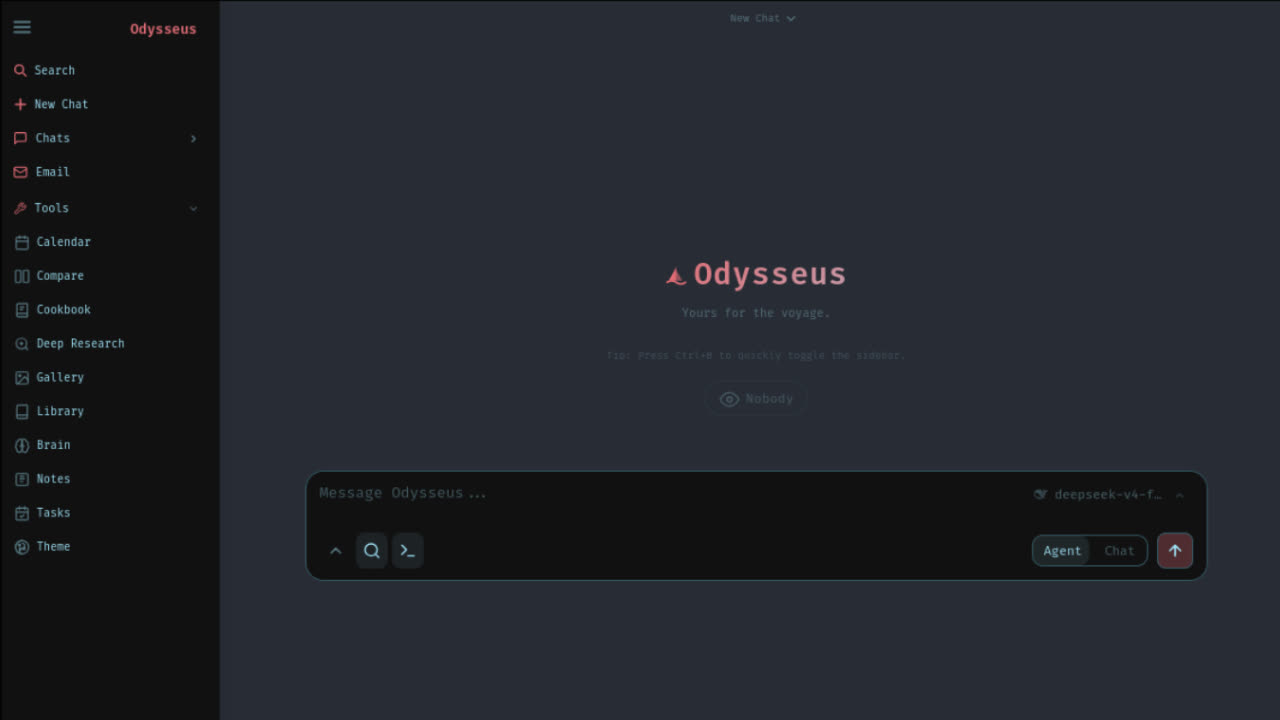
Open the exact URL printed by Docker, PowerShell, or the macOS script. Docker commonly uses localhost:7000; native macOS can print 127.0.0.1:7860. If the browser is blank, inspect logs before changing configuration.
2. Login is secured
Find the temporary admin password in first-run output or Docker logs, then change it after login. If the password is missing, search logs first. Disabling authentication is not a valid Odysseus AI install shortcut for normal users.
3. Provider is known
Choose Ollama, an API-backed provider, or another OpenAI-compatible endpoint after the app is stable. For host Ollama from Docker, confirm host.docker.internal:11434/v1. For native local setups, confirm localhost and the /v1 suffix.
4. One task runs
Run one small prompt or workflow before adding extra models, exposing LAN access, or editing advanced settings. If that first task fails, record the route, last command, local URL, provider endpoint, and redacted error rather than restarting from scratch.
Odysseus AI install FAQ
Everything you need to resolve conflicts
Odysseus AI install route validation before you run commands
A reliable Odysseus AI install starts by separating the workspace from the model backend. The workspace can run on modest hardware, but Ollama, local weights, GPU acceleration, and long workflows depend on memory, CPU, GPU, and network boundaries. Decide whether your first goal is simply opening the app, connecting an API provider, or serving local models. That decision changes the safest first command and the mistake you should avoid.
Before any Odysseus AI install, verify the GitHub owner, clone from the official repository, and keep the terminal open after the first launch. The terminal may print the local URL, service status, and temporary admin login. If you close the console too early, you may spend time searching for credentials that were already printed. This is why the install route should include a first-login capture step, not only a clone command.
Docker is useful when you want contained services, predictable restarts, and a repeatable Odysseus AI install on Windows or Linux. Native Windows is better when you are comfortable with PowerShell and want fewer container networking layers. Native Mac is usually the first choice for Apple Silicon users who care about local model performance. The wrong route can still open the app, but it may create avoidable Ollama, port, or acceleration issues later.
Treat troubleshooting as part of the Odysseus AI install path. If localhost fails, check container status before editing ports. If models do not appear, check whether Odysseus is inside Docker while Ollama is on the host. If login fails, find the generated admin password before changing auth settings. A clean install is the path where each failure has one reversible check before any destructive reset.
Use this hub as a preflight worksheet: write down the route, expected URL, first command, admin password location, model provider, and rollback plan before starting. For a team machine, also confirm who owns the terminal session and who can change firewall, Docker Desktop, antivirus, or VPN settings. These small checks turn an Odysseus AI install from trial-and-error into a controlled local setup.
Ready to start your Odysseus AI Quickstart?
Verify official github code repository, choose native Windows, Docker, or Ollama, solve port issues, and skip manual terminal debugging with the Launch Kit early access.