Odysseus Docker Install Guide:
Compose, Logs, Port 7000 & Ollama
Run Odysseus with Docker Compose without guessing where the .env file goes, why localhost:7000 does not open, where the admin password is printed, or why Docker cannot see your host Ollama server.
This Odysseus Docker guide gives you the practical path: clone the official repo, create .env, start Docker Compose, verify the compose setup, check running services, read logs, find the first admin login, fix APP_PORT, avoid unsafe APP_BIND, and connect Ollama with the right endpoint.
Odysseus is free and open source. This page is an unofficial Docker-focused setup resource designed to help you avoid common Odysseus Docker mistakes before they cost you hours.
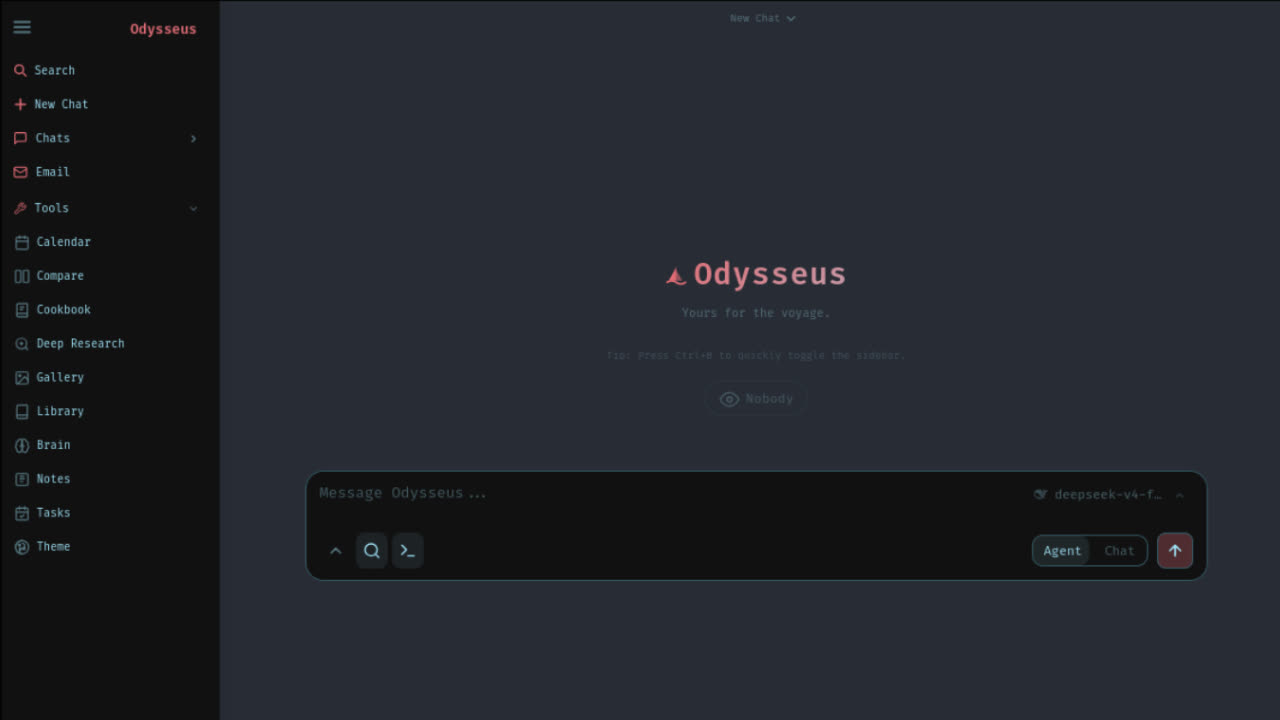
How do you install Odysseus Docker in five steps?
If you just need the short version, this is the basic Odysseus Docker path:
git clone https://github.com/pewdiepie-archdaemon/odysseus.git
cd odysseus
cp .env.example .env
docker compose up -d --build
docker compose ps
Step 4: Open app URL
Step 5: Extract Password
That is the short Odysseus Docker answer. The rest of this page explains what each command does, what you should see, how to fix localhost:7000, how to use APP_PORT, why you should be careful with APP_BIND, and how to connect host Ollama from inside Docker.
Before you run Odysseus Docker, check these basics
A failed Odysseus Docker install often comes from a missing prerequisite or a wrong assumption. Check these before you run Docker Compose. Use the interactive boxes below to confirm your local readiness.
Git Installed
git --versionYou should clone the official repo instead of downloading random files
Docker Running
docker infoDocker Compose cannot start containers if Docker Desktop / daemon is stopped
Docker Compose Available
docker compose versionOdysseus uses Docker Compose, not basic single docker run commands
Official GitHub Repository
pewdiepie-archdaemon/odysseusTarget the verified pewdiepie-archdaemon/odysseus repository
.env Config File
cp .env.example .envCreates copy of overrides and makes deployment configuration visible
Port 7000 Availablity
netstat -ano | grep 7000The default frontend maps straight to localhost:7000 on startup
Ollama Route Known
host.docker.internalDocker container setups require specific internal communication mappings
If you are unsure whether Docker is the right path, use the Setup Path Checker before continuing. Docker is useful for many users, but Windows native or macOS native can be better depending on your machine and local model goals.
DOCKER PATH
You're this close.
Don't waste the night.
You've read the Docker guide. You know the commands. But here's what you don't know: when something breaks, will you check container logs first? Or port conflicts? Or did you forget .env?
Launch Kit tells you exactly where.
Launch Kit tells you exactly where. A decision tree. A checklist. A path forward.
Save one evening. That's all we ask. $19.9 buys back your night.
Launch Kit gives you:
Preflight Checklist
Validate your environment before anything breaks.
Docker Setup Path
Step-by-step installation and configuration.
Ollama Endpoint Mapping
Connect, test, and verify your endpoint.
Port 7000 Repair Tree
Fix conflicts. Fast.
Admin Password Capture
Secure access without the guesswork.
First Workflow Templates
Get from 0 → working in minutes.
Save one evening.
That's all we ask.
ONE-TIME ACCESS
$19.9
Beta price
Secure checkout
Powered by Stripe
30-day satisfaction
guarantee
Built by developers
for developers
Step 1: Clone the official Odysseus repo
Start your Odysseus Docker setup from the official GitHub repository. Do not start an Odysseus Docker install from an unknown .exe, random ZIP mirror, or re-uploaded repository. Docker does not make unknown source code automatically safe.
git clone https://github.com/pewdiepie-archdaemon/odysseus.git
cd odysseus
You should now be inside the odysseus folder on your local filesystem drive.
Confirm Git is properly installed; check your active internet connection, avoid cloning into administrative protected folders; delete any corrupted partial folders and retry.
Step 2: Create the .env file
Odysseus Docker can run with defaults, but copying .env.example makes the important deployment settings visible. Start with safe local defaults. Do not paste API keys or private tokens into random tools or public forms. If you use provider keys later, prefer configuring providers inside the app unless you know why you need pre-seeding.
cp .env.example .env
A local .env configuration file exists cleanly in your root odysseus folder.
You usually do not need to edit .env before the first Docker run. Keep variables like APP_BIND locked to loopback interfaces.
Step 3: Start Odysseus with Docker Compose
Launch the virtual containers containing Odysseus services. The most useful Odysseus Docker habit is simple: after docker compose up, always run docker compose ps, then read logs before changing config files.
docker compose up -d --build
What this does: builds the local Odysseus image, instantiates backend database volumes, starts supporting containers, and runs the active environments inside background processes with -d.
docker compose ps
Expected result: You should see Odysseus and any bundled supporting database services listed as healthy.
Do not randomly modify code files. Check the terminal outputs first: docker compose logs --tail=120 odysseus.
Step 4: Open Odysseus at localhost:7000
When the Odysseus Docker containers are healthy and report running, direct your web browser straight to the local workspace address:
Click to launch the endpoint in a new browser tab.
What to check when localhost fails:
| Symptom | Likely cause | First check |
|---|---|---|
| Browser says connection refused | Containers not running | docker compose ps |
| Browser never loads | App still starting or service unhealthy | docker compose logs --tail=120 odysseus |
| Port already in use | Another app owns 7000 | set APP_PORT=7001 |
| You changed the port | You are opening the wrong URL | open http://localhost:<APP_PORT> |
| You are on your phone | Phone localhost means the phone, not your computer | use trusted LAN/VPN only |
| You used public domain too early | unsafe exposure path | keep localhost first |
Step 5: Find the admin password in Docker logs
On first setup, Odysseus creates an admin account and prints a temporary password. For Odysseus Docker installs, the password line is printed in the Odysseus container logs. Use terminal filters to extract it immediately.
docker compose logs odysseus | grep -i password
docker compose logs -f --tail=200 odysseus
Post-Login Safety Steps:
- Open
http://localhost:7000in your browser window. - Log in with the generated temporary admin password from the log outputs.
- Change your primary account password in Settings immediately.
- Do not paste this password into public forums, support chats, screenshots, or GitHub issue trackers.
Port 7000 Decision Tree & Fix Assistant
If your web browser shows connection errors loading localhost:7000, answer the brief diagnostic questionnaire below to receive your customized.env override guidelines instantly.
🔍 Awaiting Direct Diagnostics
Toggle the questionnaire options above to run the port troubleshooting engine.
Confirm if Odysseus is marked as UP in "docker compose ps" and inspect port conflicts or browser connection states.
docker compose ps
Fix port 7000 safely: APP_PORT is not APP_BIND
Two Odysseus Docker environment settings are frequently confused by builders. Avoid disabling loops just to route conflicts. Do not use APP_BIND=0.0.0.0 just to fix standard port conflicts. That changes the global network exposure boundary. Keep binds locked local.
Modifies the exact host logical network port mapping port numbers you access within local web browsers. Safe to change to 7001, 7002 etc if other local background services are blocking port 7000.
Modifies who has authorization to route queries to container services. Changing this expands network visibility. Change only for intentional LAN / reverse proxy access.
Re-create Environment After Modifying:
docker compose up -d --build
Navigate to: http://localhost:7001 (or your custom APP_PORT mapping).
Docker + Ollama Connection Endpoint Resolver
Many Odysseus Docker problems are actually Ollama endpoint problems. Inside the Odysseus Docker environment, 'localhost' points strictly to the container itself. In order to talk to local model services on your host computer, you must map the virtual DNS endpoints cleanly.
Important DNS virtual hook: Inside the Odysseus Docker environment, "localhost" points directly to the container itself. To link up to Ollama running as a native app on your host computer, you must configure this virtual DNS.
curl http://host.docker.internal:11434/api/tags # Test host from inside containerPaste this URL into your custom provider configuration settings inside Odysseus page settings.
Odysseus Docker Error Doctor Mini
Before editing config files, diagnose your primary logs path. Clicking an active symptom tab instantly provides expected solutions.
Symptom: docker compose up exits immediately
When launching containers, the process exits cleanly or outputs build failed states.
docker compose logs --tail=120 odysseus
Likely causes: Docker daemon not running; missing .env file; port conflict blocking sockets; database volumes corrupt during parallel executions.
Safety warning: do not expose raw Odysseus or Ollama ports publicly
Odysseus Docker represents an advanced, local-first artificial intelligence workstation bundled with integrated terminal tools, file persistence nodes, local database, memory databases, and model interfaces. Treat this application with the exact same security considerations as an administrative computer command console.
Never toggle AUTH_ENABLED=false in public server environments. Keep credentials mandatory.
Map APP_BIND=127.0.0.1 to prevent outer local network connections by default.
Never publish your host Ollama port 11434 output to open public internet channels under any circumstances.
After Odysseus Docker runs: what should you try first?
Many users finish an Odysseus Docker install and then stare at a blank workspace. The real value starts after the app opens and a model route works. Explore these starter tasks to execute inside your new workspace.
Research Agent Setup
Instruct Odysseus to aggregate online journals, cross-verify data structures, and draft outlines.
Log Inspector Agent
Paste Docker logs safely. The local agent helps interpret socket errors without exposing keys.
SEO Blueprint Agent
Aggregate search results data and parse it straight into structured page blueprints.
Want the automated Odysseus Docker setup package?
We are building the Odysseus Launch Kit as a transparent setup package — not arbitrary executable installers. It runs local hardware preflight checks, pulls official source repositories, prepares secure loopback .env keys, maps docker ports, and installs starter agent templates dynamically.
No payment credentials required today.
Odysseus Docker FAQs
Everything you need to know about setting up, troubleshooting, and securing PewDiePie's Odysseus platform inside Docker landscapes.
Ready to run Odysseus with Docker?
Start with the official repo, create .env, run Docker Compose, check logs, open localhost:7000, find the admin password, connect Ollama correctly, and keep your compose setup local-first.