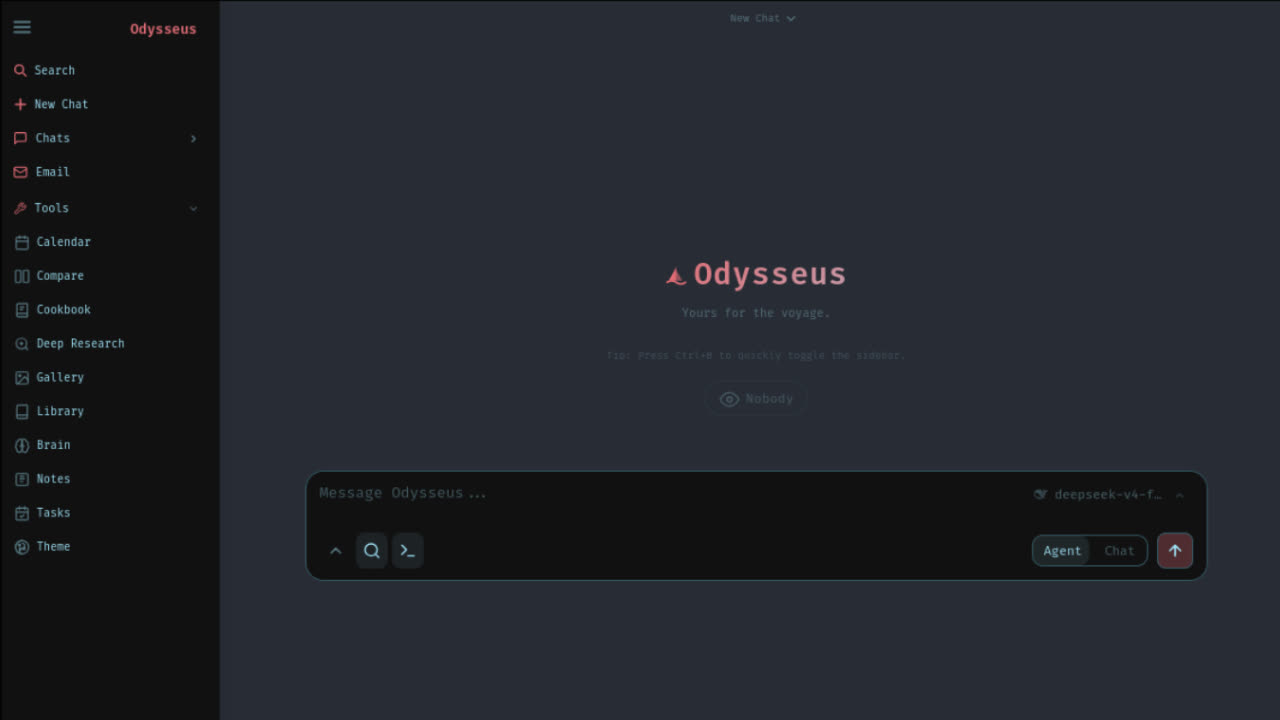
What Odysseus AI is in one minute
The short answer to what is Odysseus AI is this: Odysseus AI is an open-source workspace for running a private, configurable AI environment around chat, agents, Cookbook recipes, memory, research, compare, documents, notes, tasks, email, calendar, and model serving decisions. It is not just a prompt box and it is not just a model. It is a local-first interface and workflow layer that you host yourself.
That definition matters because many users discover Odysseus from videos, social posts, or GitHub links and expect a simple app download. A better mental model is local ai workspace. You install or run the workspace, then decide whether your models come from local runtimes such as Ollama or from API providers. The user experience can feel close to a modern AI chat application, but the ownership model is closer to a developer tool.
The official project materials describe a self-hosted interface for talking to LLMs and organizing tools around chat, autonomous agents, model serving, email, research, and local-first privacy. This page translates that into practical buying-language: what it does, what it does not do, who should try it, and which guide you should read next.
The problem it tries to solve
The normal AI workflow is fragmented. One tab has ChatGPT. Another tab has Claude. A terminal runs local models. A browser extension holds snippets. A notes app stores prompts. A GitHub repo stores scripts. A separate agent experiment holds temporary workflows. Odysseus AI tries to pull more of that work into one self hosted ai workspace so you can experiment, compare, and reuse patterns without rebuilding your environment every time.
The second problem is trust. Hosted AI products are easy to use, but you do not control the whole environment. Local tools offer more control, but they often feel like disconnected utilities. Odysseus is aimed at users who want a more complete workspace while still caring about local-first behavior, source verification, and the ability to inspect what they are running.
The third problem is repeatability. A one-off prompt can be useful, but serious work needs repeatable instructions, stable model choices, source material, documents, memory, and a way to compare outputs. That is where Odysseus features such as chat agents Cookbook flows, compare, research, documents, and memory become more important than the first screenshot.
Core Odysseus features matrix
Odysseus features are broad, so evaluate them by job rather than by hype. If you only need an answer from a strong hosted model, a cloud chatbot may be enough. If you want a configurable workspace that can combine chat, agents, files, model choice, and local setup, Odysseus AI becomes more interesting.
Chat
A local web interface for conversations with API models or local models, useful when you want a familiar chat layer without giving every workflow to one hosted app.
Agents
Task-oriented agent flows for people who want Odysseus to do more than answer a prompt, while still keeping setup and logs under their own control.
Cookbook
Reusable recipes and workflow patterns that turn repeated prompts into more structured actions, especially when you are building repeatable local ai workspace habits.
Research and compare
Research, document, comparison, and workspace features for testing multiple models or approaches before you commit to one provider or one local model.
Memory and tools
Memory, skills, documents, notes, tasks, email, calendar, and related workspace ideas that make Odysseus feel closer to an operating layer than a single chat box.
Local or API models
A setup path that can connect to local Ollama style models or hosted API providers, depending on your hardware, privacy target, and reliability needs.
The useful phrase is not “Odysseus does everything.” The useful phrase is “Odysseus gives you a workspace where these pieces can live together.” That is a different promise from a standalone local model UI, a hosted chat product, or a single-purpose agent demo.
You chose Odysseus. Now let's get you running, not just reading.
Launch Kit tells you exactly where. The bridge between "I chose Odysseus" and "I'm using Odysseus". Not more documentation, but a decision-making kit. The first night should be about exploring, not troubleshooting.
Local-first does not mean every token is local
A common misunderstanding is that local-first automatically means every model response runs on your machine. In practice, separate the workspace from the model. The workspace can be self-hosted. Your model can be local, API-backed, or mixed. A private note can stay in your local environment, while an API call to a hosted provider still sends prompt content to that provider. The boundary depends on your configuration.
If your goal is maximum local control, start by learning how Odysseus connects to Ollama and what hardware your model needs. Small local models can be fast enough for basic tasks, while larger models may require more memory, GPU acceleration, or patience. If your goal is best answer quality with less hardware, an API provider may be practical, but it changes the privacy and cost model.
This is why the phrase odysseus ai setup is important. Setup is not only installation. Setup includes the model endpoint, environment variables, localhost behavior, Docker or native runtime choice, port access, admin login, secrets handling, and how you plan to recover from errors.
Who should and should not use it
Odysseus AI is best for users who want control and are willing to read. If you can verify a GitHub repository, inspect README commands, understand that Docker and native setup are different, and follow a troubleshooting path, you are closer to the target user. You do not need to be an expert developer, but you do need to be comfortable with technical setup.
Good fit
You want a self hosted ai workspace, you are comfortable reading GitHub instructions, and you want chat, agents, Cookbook, memory, research, and documents in one local-first environment.
Maybe fit
You are mainly curious because of viral videos or social posts. Start with the GitHub guide and tutorial before assuming it replaces ChatGPT, Claude, or every local model UI.
Poor fit
You need a no-terminal consumer app, managed account recovery, hosted billing, enterprise support, or a guaranteed one-click desktop installer today.
It is not a good first choice if you need a polished hosted SaaS account with managed support, simple password recovery, automatic billing, and no terminal exposure. It is also not a magic replacement for high-end cloud models. A local workspace can improve control and workflow, but model quality still depends on the model you choose.
Cost and hardware expectations
The source project may be open, but running AI is never truly free. Local models cost hardware, electricity, time, storage, and debugging effort. API models cost provider usage fees and require you to manage keys safely. Docker costs disk space and sometimes extra memory. Native setup costs more environment discipline. A realistic guide should say this clearly before a user installs anything.
If you use local models, start smaller than your ambition. A model that technically downloads may be too slow for daily work. If you use API models, set usage limits and avoid pasting secrets into logs or screenshots. If you use Docker, learn where logs live and how to stop containers. If you use native macOS or Windows, keep Python and virtual environments isolated from unrelated projects.
The smartest first test is a boring one: get the interface running, open localhost, complete a basic chat, verify one model route, and record what you changed. Only after that should you explore agents, Cookbook recipes, research flows, memory, phone access, or more complex tools.
Odysseus vs ChatGPT, Claude, and Open WebUI
Compared with ChatGPT, Odysseus AI is less convenient but more controllable. ChatGPT gives a managed product, strong models, account-based history, and very low setup friction. Odysseus gives you a self-hosted workspace and more responsibility for installation, model routing, updates, and security.
Compared with Claude, the contrast is similar. Claude is a hosted assistant experience with strong writing, reasoning, and document workflows. Odysseus is an environment you run, configure, and connect to models. The question is not which name is more exciting. The question is whether you want a managed assistant or a local workspace layer.
Compared with Open WebUI, Odysseus should be evaluated around workspace breadth. Open WebUI is often attractive to users who want a strong local model interface. Odysseus aims wider: chat, agents, Cookbook, research, documents, memory, email, notes, tasks, and model serving ideas in one setup. That breadth is useful if you need it, and unnecessary if you only want a clean local model chat UI.
Use official sources before tutorials
The odysseus ai github source should be your first verification point. Start with the official repository, then use helper guides to understand the route. A tutorial can explain decisions, but the source of truth for commands should remain the official repo and official project page. This protects you from fake download pages, stale copied commands, and videos that skip security details.
When you open the repository, inspect the README, license, security notes, threat model, Docker files, environment example, platform scripts, and setup files before running anything. That does not mean you need to audit every line of code before experimenting, but you should know where the commands come from and what they are supposed to start.
If a page asks for API keys, admin passwords, or private logs before explaining the source, pause. If a page offers a binary that does not appear on the official release page, pause. If a fork claims to be safer or easier, compare the diff first. Most users should not need a modified build for a first evaluation.
Choose the next guide by intent
If you came here asking what is odysseus ai, the next step depends on your intent. If you are checking legitimacy, read the GitHub guide. If you are trying to get files safely, read the download guide. If you are ready to run it, read the setup guide. If you already have the interface open, read the tutorial. If models are your blocker, read the Ollama models guide.
Verify source
Use the Odysseus AI GitHub guide before trusting commands, forks, mirrors, release assets, or third-party installers.
Download safely
Use the download guide if you need to understand GitHub source, releases, ZIP files, clone commands, and fake installer risk.
Set it up
Use the setup guide when you are ready to choose Docker, native Windows, native macOS, Apple Silicon, Linux, or model endpoints.
Learn the workflow
Use the tutorial after localhost is open and you want the first chat, model check, agent test, and safe next experiment.
A careful sequence is faster than random command copying. Verify the project, get the source, choose a setup route, run one basic session, then add local models, API models, agents, Cookbook recipes, and research workflows one at a time.
FAQ
What is Odysseus AI?
Odysseus AI is an open-source, self-hosted AI workspace that combines chat, agents, Cookbook-style recipes, memory, research, documents, and model configuration in a local-first web interface.
Is Odysseus AI the same as ChatGPT?
No. ChatGPT is a hosted cloud product. Odysseus AI is a self-hosted workspace you run yourself, then connect to local models or API providers depending on your setup.
Does Odysseus AI require local models?
Not always. You can think of the model layer separately from the workspace layer. Some users connect local Ollama models, while others use API providers for stronger models or simpler hardware requirements.
Where is the official Odysseus AI GitHub source?
The official source users should verify first is the pewdiepie-archdaemon/odysseus repository on GitHub. Use that source before trusting third-party downloads, mirrored ZIP files, or copied setup commands.
What should I read after this definition guide?
If you are deciding whether to try it, read the GitHub guide first. If you are ready to install, use the setup guide. If you already have it running, use the tutorial and Ollama model guides.