Quick verdict
The real comparison is not just model quality. Odysseus AI vs ChatGPT is a choice between two operating models. ChatGPT is a managed OpenAI product that removes infrastructure decisions from the user. Odysseus AI is a self hosted ai vs chatgpt style alternative: you bring the repository, runtime, model endpoints, file boundaries, and maintenance discipline. One gives you convenience. The other gives you control.
Choose ChatGPT when your goal is to open a browser, ask questions, write, brainstorm, analyze, and move on. That is the most pragmatic answer for many people. There is no Docker stack to inspect, no repository to update, and no local model server to tune. If your team mostly needs a reliable cloud AI assistant and accepts a managed service data boundary, ChatGPT is the simpler default.
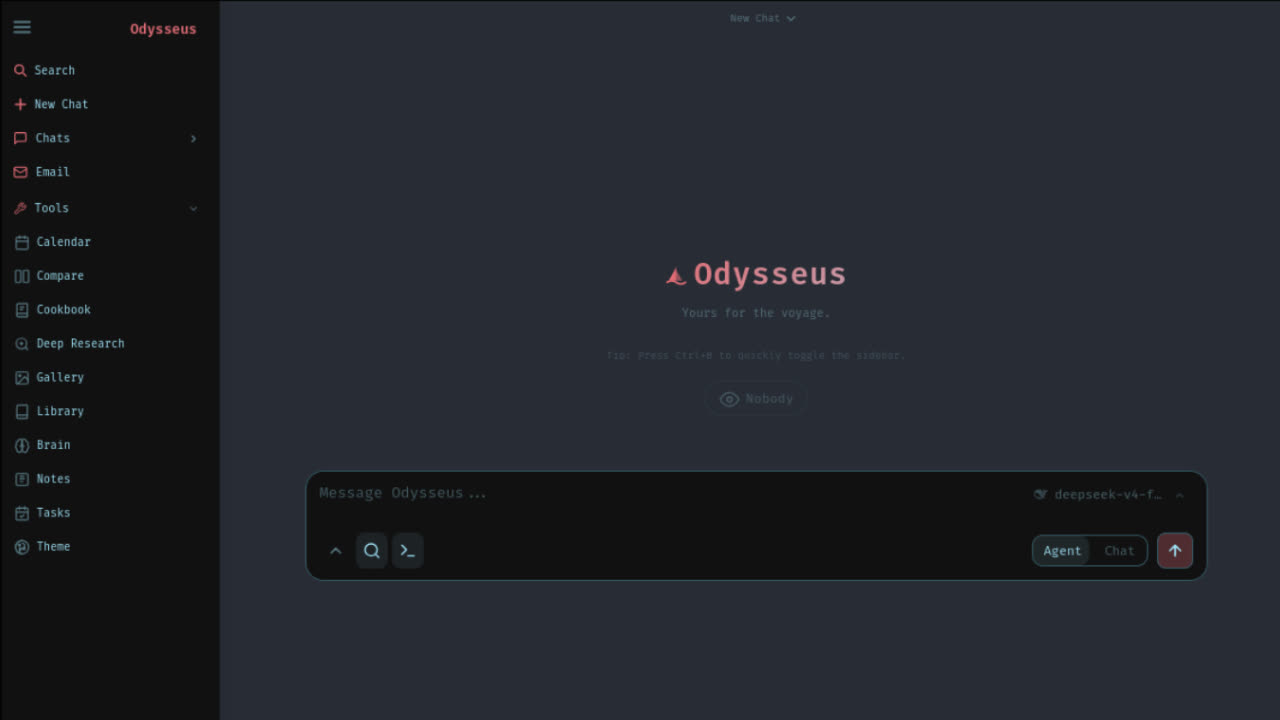
Choose Odysseus AI when your goal is to build a local AI workspace around files, agents, model routing, repeatable setup, and private experimentation. The official Odysseus AI GitHub repository describes a local-first workspace with chat, agents, Cookbook, research, documents, memory or skills, and model serving choices. That makes it closer to an inspectable workbench than a pure chat box.
Comparison table
| Decision point | Odysseus AI | ChatGPT |
|---|---|---|
| Best fit | Users who want a self-hosted AI workspace they can inspect, run, connect to local models, and adapt around documents, agents, and tools. | Users who want a polished hosted AI chat product with very low setup effort and managed availability. |
| Data boundary | You control the server, repository, environment variables, model endpoints, and local files you connect. External API calls still leave your machine when you configure them. | OpenAI operates the service. Your practical boundary depends on account settings, organization controls, product terms, and the data you submit. |
| Setup effort | Requires GitHub source verification, git clone, environment setup, Docker or native commands, and maintenance when the project changes. | Requires an account and a browser or app. Infrastructure, uptime, and product updates are managed for you. |
| Model choice | Can connect to local Ollama models and API providers when configured, making it a local AI workspace with flexible model routing. | Uses models and tools made available by OpenAI inside ChatGPT. You do not manage the serving stack. |
| Agent workflow | Built around a workspace idea: chat, agents, Cookbook, documents, memory or skills, research, and other local-first capabilities from the project. | Strong for conversation, drafting, analysis, and hosted tools; agent-like workflows depend on ChatGPT product features and workspace settings. |
| Cost reality | Software may be open source, but you still pay with time, compute, storage, electricity, API usage, backups, and maintenance. | Cost is mainly subscription or usage tier plus the convenience of managed infrastructure. Exact plans change, so verify on official OpenAI pages. |
If you are searching for a ChatGPT alternative because you dislike subscriptions, do not stop at sticker price. A self-hosted workspace still costs time and compute. If you are searching because you need privacy first AI control, auditability, local model routing, or a workspace you can shape around documents and agents, Odysseus AI deserves a closer look.
Privacy and data boundary
Privacy is where the comparison becomes most concrete. With ChatGPT, you are using a hosted OpenAI service. That means the application, account system, model access, product controls, and infrastructure are managed outside your machine. You should make decisions from official OpenAI and ChatGPT documentation, especially if your organization has legal, compliance, or sensitive data requirements.
With Odysseus AI, the workspace can run on your own machine or server. That does not magically make every workflow private. The boundary depends on your model choices. If you connect a local Ollama model and keep files local, the practical boundary can be very different from a cloud-only workflow. If you connect an external API provider, prompts and outputs for that call leave your environment. A careful Odysseus AI setup should make that distinction visible before users paste private documents.
This is the strongest reason to consider Odysseus AI vs ChatGPT as a workspace decision, not a brand decision. ChatGPT gives you a managed product and official settings. Odysseus AI gives you responsibility for server access, environment files, model endpoints, logs, backups, browser exposure, and update hygiene. More control is useful only if you are willing to operate it responsibly.
You chose Odysseus. Now let's get you running, not just reading.
Launch Kit tells you exactly where. The bridge between "I chose Odysseus" and "I'm using Odysseus". Not more documentation, but a decision-making kit. The first night should be about exploring, not troubleshooting.
Setup and maintenance
ChatGPT has a low setup burden. You open the official ChatGPT app or website, sign in, and start working. That matters. The biggest source of productivity loss in self-hosted AI is not always model quality; it is installation drift, dependency mismatches, broken ports, forgotten environment variables, and local services that changed after an update.
Odysseus AI setup starts with source verification. Use the official GitHub repository, confirm the owner and project name, read the README, inspect the environment example, and choose one supported path. Typical self-hosting decisions include Docker Compose versus native setup, local port access, Ollama endpoint mapping, API keys, file paths, and how the workspace should be exposed on your network.
This maintenance burden is not a flaw if you want a developer-style local AI workspace. It is the price of control. If you enjoy reading logs, cloning repositories, updating services, and understanding what runs on your machine, Odysseus AI can be satisfying. If those tasks feel like friction, ChatGPT is the more realistic daily driver.
For a safer starting point, use the existing Odysseus AI GitHub guide, then move to the Odysseus setup guide. Those pages keep the setup path separate from this comparison so the odysseus ai vs chatgpt decision does not get buried under command snippets.
Agents and workspace capabilities
The official Odysseus project positions itself as more than a basic chat UI. The public project materials describe chat, agents, Cookbook, deep research, compare workflows, documents, memory or skills, email, notes, tasks, calendar, and mobile-oriented access. That list matters because many users searching for self hosted ai vs chatgpt are not just asking for another prompt box. They want a workspace where repeated tasks, documents, and model choices are closer to the surface.
ChatGPT is strong when you want a polished conversation loop, writing assistance, coding help, analysis, and hosted tools that are already integrated into the product. You do not need to decide where the agent runtime lives. You also do not get the same repository level freedom to inspect and modify the surrounding application.
Odysseus AI is more appealing when the workspace itself is the product you want to own. You can treat the official repository as a base, wire local models, isolate projects, inspect configuration, and build habits around a local-first environment. That is why the phrase local AI workspace is more precise than simply calling it a ChatGPT alternative.
Model choices
ChatGPT abstracts model serving away from the user. That is a benefit for normal usage. You do not choose GPU memory, quantization, local endpoint URLs, container networking, or a model server. You use the capabilities OpenAI exposes through ChatGPT, and you rely on OpenAI to operate the service.
Odysseus AI makes model routing part of the setup conversation. You may connect local Ollama models for private experiments, use API providers for stronger hosted models, or compare model behavior across workflows. This flexibility is useful for developers, researchers, and privacy-conscious users who understand that every endpoint has a boundary.
The tradeoff is that local models are not magic. They vary by size, hardware need, context window, reasoning quality, speed, and reliability. A lightweight local model may be excellent for notes or simple private drafting, while a hosted model may still be better for difficult reasoning. A serious Odysseus AI vs ChatGPT comparison should admit that many users will end up using both: local models for sensitive or routine work, and ChatGPT or other hosted models for tasks that need stronger general capability.
Documents, research, and memory
Documents are another area where ownership matters. If you are evaluating confidential notes, internal plans, source files, PDFs, or research packets, the question is not only which assistant writes better. The question is where documents live, which model sees them, how long derived context remains accessible, and who can inspect the workflow when something goes wrong.
ChatGPT gives many users a mature hosted workflow for uploading, discussing, summarizing, and transforming information. That is convenient and often enough. For public material, personal productivity, and non-sensitive analysis, a hosted product may be a better use of time than maintaining a local stack.
Odysseus AI is attractive when you want the workspace to stay closer to your machine. Its document, research, memory, and skills direction fits users who want to build a repeatable private workspace rather than move every file into a managed chat product. The practical quality still depends on your setup, model choice, and how the project evolves, but the architectural intent is different.
Cost reality
Cost comparisons often get lazy. ChatGPT may involve a subscription or other official plan, but the operational cost is simple: you pay for a managed product and avoid running the stack. Because plan names, feature bundles, and prices can change, verify any exact ChatGPT pricing on official OpenAI pages before making a purchasing decision.
Odysseus AI may be open source, but self-hosting has real cost. You spend time verifying the repository, installing dependencies, fixing Docker or native setup issues, choosing models, maintaining updates, and protecting your environment. If you use local models, you pay in hardware, storage, memory pressure, electricity, and slower output on weak machines. If you use external APIs, you still pay provider usage costs.
The fair conclusion is this: choose ChatGPT when managed convenience is worth more than infrastructure control. Choose Odysseus AI when control, inspectability, and local model options are worth the operational overhead. For many technical users, the best cost strategy is not one tool forever; it is using the right tool for each class of work.
Who should choose which
Choose ChatGPT
Pick ChatGPT for low-friction writing, analysis, coding help, team adoption, browser access, and managed reliability. It is the practical default when privacy requirements are normal and setup time is expensive.
Choose Odysseus AI
Pick Odysseus AI for a local AI workspace, privacy first AI experiments, local model routing, source-level control, agent workflows, and learning how a self-hosted AI app actually works.
Avoid Odysseus AI
Avoid self-hosting if you cannot maintain Docker, Git, environment files, browser ports, backups, or model endpoints. A broken local stack is worse than a working hosted assistant.
Avoid ChatGPT-only
Avoid a cloud-only workflow when sensitive local files, audit requirements, model endpoint control, or offline experiments are central to your work.
If your search intent is "odysseus ai vs chatgpt" because you saw a viral demo, slow down and map the decision to your real workflow. Do you need a polished assistant today, or do you need an inspectable system you can run? Do you want hosted reliability, or do you want a workspace that can route to local models? Those questions matter more than hype.
Migration path
A safe migration does not require deleting ChatGPT from your workflow. Start by keeping ChatGPT for high-value hosted tasks while testing Odysseus AI on a narrow local workflow. Good first workflows include private notes, a small document set, a local model smoke test, or an agent experiment that does not touch production credentials.
- Verify the official Odysseus AI GitHub repository and read the project README before running any command copied from social media.
- Complete one Odysseus AI setup route: Docker Compose, native Windows, native macOS, or a Linux path. Do not mix multiple tutorials in one terminal session.
- Connect one local Ollama model and run a harmless prompt. Confirm the local endpoint works before adding private documents.
- Keep ChatGPT as your fallback for difficult reasoning and fast drafts while Odysseus AI handles local experiments and workspace-specific tasks.
- After a week, compare actual usage: task completion, setup pain, privacy boundary, cost, speed, and whether the local AI workspace changed your daily behavior.
This staged path turns Odysseus AI vs ChatGPT from a theoretical comparison into a real workflow test. If Odysseus AI saves time, increases privacy confidence, or gives you more control, keep investing. If it becomes maintenance drag, keep ChatGPT as the primary assistant and revisit self-hosting later.
Source notes
This page treats the official Odysseus AI GitHub repository and official Odysseus project page as the source of truth for Odysseus features and setup direction. For ChatGPT, use official OpenAI and ChatGPT pages for product details, plan information, enterprise controls, and current availability. This page avoids hard-coding volatile ChatGPT prices or model names because those details can change.
FAQ
Is Odysseus AI a ChatGPT alternative?
Odysseus AI can be a ChatGPT alternative for users who want a self-hosted AI workspace, local model routing, repository-level control, and a privacy first AI posture. It is not a drop-in replacement for the hosted ChatGPT product because setup, maintenance, reliability, and account features are very different.
Which is more private, Odysseus AI or ChatGPT?
Odysseus AI gives you more control over where the workspace runs and which model endpoint receives prompts. That can improve the data boundary when you use local models. ChatGPT is a managed OpenAI service, so privacy depends on the official product settings, terms, and the data you choose to send.
Do I need Odysseus AI setup experience before comparing it with ChatGPT?
You do not need deep experience, but you should understand the Odysseus AI setup path: verify the official GitHub repository, clone the project, configure environment variables, choose Docker or native setup, and connect local or API models.
Can Odysseus AI use local models while ChatGPT cannot?
Odysseus AI is designed to work with model endpoints you configure, including local Ollama setups. ChatGPT is a hosted OpenAI product; users interact with models exposed through ChatGPT rather than running the ChatGPT service locally.
Should a beginner choose ChatGPT first?
Most beginners should start with ChatGPT if they need immediate productivity and do not want to maintain software. Beginners should choose Odysseus AI only if their main goal is learning self-hosting, local models, GitHub setup, and private workspace control.
Next step
If this comparison points you toward self-hosting, start with source verification before setup. The safest next page is the Odysseus AI GitHub guide, followed by the setup guide and Ollama model guide.