Short answer
PewDiePie Odysseus AI refers to the Odysseus project users find at the official pewdiepie-archdaemon/odysseus GitHub repository and companion GitHub Pages site. The practical question is not whether a famous name appears in search results. The practical question is whether you can verify the source, understand the product, and try it without exposing secrets, opening unsafe ports, or downloading a random installer.
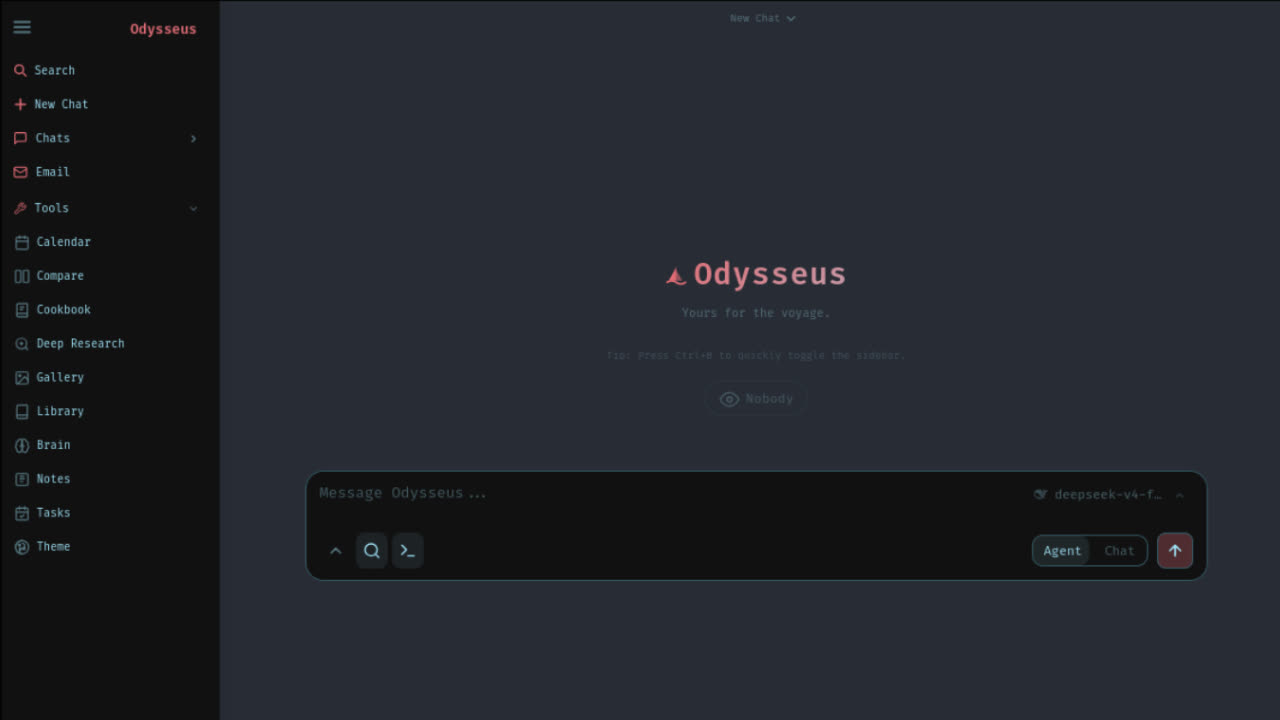
The project describes itself as a self-hosted AI workspace. In plain terms, it is closer to a local workspace around language models than a single chatbot clone. It can connect to local model runtimes or external APIs, provide a chat interface, run agent workflows with tools, help serve models through Cookbook, compare model answers, run deep research, manage documents, and keep memory or task context inside your own environment.
If you came here from a video, a social post, or a search for pewdiepie ai, start with verification: open the official GitHub source, read the README, inspect the project site, and choose one setup route. Do not treat a third-party “download now” page as the same thing as the official project.
Is it really connected to PewDiePie or Felix?
Searchers use phrases like pewdiepie odysseus, felix odysseus ai, and pewdiepie self hosted ai because the visible repository owner is named pewdiepie-archdaemon. That is enough to explain the search behavior, but it is not a reason to make claims beyond the official source. This page is an independent guide and does not claim affiliation with PewDiePie, Felix Kjellberg, or the official Odysseus project.
What can be verified is the source location and the project description. The official GitHub repository is public and contains README.md, source folders, Docker files, launcher scripts, security files, and setup instructions. The official project site describes Odysseus as a local-first, privacy-first, self-hosted interface for language models with chat, autonomous agents, tools, model serving, email, research, and more.
That distinction matters for SEO and for user safety. “PewDiePie built an AI app” is a claim that should be handled carefully. “The official repository users are searching for is under pewdiepie-archdaemon/odysseus, and the project documents a self hosted AI workspace” is precise, useful, and verifiable.
You chose Odysseus. Now let's get you running, not just reading.
Launch Kit tells you exactly where. The bridge between "I chose Odysseus" and "I'm using Odysseus". Not more documentation, but a decision-making kit. The first night should be about exploring, not troubleshooting.
What Odysseus AI actually does
Odysseus is best understood as a workspace layer around models and tools. The official pages describe chat with local models or API providers, autonomous agents that can plan and call tools, MCP and built-in tools, Cookbook for model recommendations and serving, Deep Research for multi-step source gathering, Compare for side-by-side model answers, and document workflows where AI assists rather than taking over the whole writing process.
The memory and skills angle is important. A useful local assistant needs context, retrieval, and reusable workflows. The official README describes persistent memory and skills that can evolve over time. That is why the product is broader than “just a chat UI.” A user evaluating PewDiePie Odysseus AI should decide whether they need a whole workspace or only a simple local chat front end.
The official site also describes email assistance, notes, tasks, calendar sync, mobile access, image tools, file uploads, web search, presets, sessions, and two-factor authentication. Not every user will use every module. The value is that the project tries to put many AI-adjacent workflows in one self hosted AI workspace.
Chat and agents
Use local or API models, then give agents tools for multi-step work when you are comfortable with the risk boundary.
Cookbook and models
Use hardware-aware model guidance after the app runs, especially if you plan to connect Ollama or serve local models.
Research and documents
Use multi-step research, comparison, document editing, and structured synthesis instead of keeping every task in a plain chat box.
Memory and workflow context
Use persistent memory, skills, notes, tasks, and calendar context when you want an assistant that improves across repeated work.
What hype gets wrong
The first misunderstanding is that Odysseus is only a celebrity-branded chatbot. It is more accurate to treat it as an open-source self-hosted workspace that attracted attention because of its repository identity, design, feature scope, and local-first positioning. The second misunderstanding is that “self-hosted” means no setup. Self-hosted usually means you are responsible for dependencies, ports, authentication, model routes, logs, backups, and updates.
The third misunderstanding is that local-first always means every model runs on your laptop. The official material explains local endpoints and optional external integrations. You may use Ollama, vLLM, llama.cpp, OpenRouter, OpenAI, GitHub Copilot, or other routes depending on configuration. The privacy boundary changes depending on which endpoint you choose.
The fourth misunderstanding is around downloads. A random odysseus ai download result is not automatically safe. Verify the official GitHub repo, check the releases page, and inspect files before running scripts. If a page asks for credentials before you have a local app running, close it. Source verification is part of setup, not an optional detail.
Data and tool boundaries
The most important setup decision is not cosmetic. It is the boundary between local data, local models, external model APIs, tool execution, and network exposure. A self-hosted app can keep more control on your machine, but only if you choose endpoints and permissions deliberately. If you connect an external model provider, prompts and returned content may leave your machine according to that provider route. If you enable agent tools, the assistant can do more work, but the tool permissions deserve more attention than the landing page screenshot.
Treat the first session as a non-sensitive smoke test. Confirm the local URL, confirm authentication, change any temporary credential, test a small prompt, and verify model routing before adding private notes, documents, email accounts, or persistent memory. This keeps a fun PewDiePie AI discovery from becoming a rushed security mistake. The same rule applies to any local agent stack, not only Odysseus.
Also decide who can reach the app. Loopback-only localhost access is different from LAN access, a reverse proxy, a public tunnel, or a VPS deployment. The official material notes local-first behavior and gives setup details around binding, ports, authentication, and optional integrations. Keep the default private posture until you have a real reason to expose the workspace, and use the troubleshooting guide when an access problem appears.
Official source verification checklist
Use a simple verification checklist before trying commands. The official github source should be the repository at github.com/pewdiepie-archdaemon/odysseus. The official project site should link back to that repository. The README should describe what the app is, what setup routes exist, what ports are used, how authentication works, and which model endpoints are supported.
Read the file names before you run them. SECURITY.md, THREAT_MODEL.md, .env.example, docker-compose.yml, launch-windows.ps1, start-macos.sh, requirements.txt, setup.py, and Docker GPU overlay files all tell you something about the risk boundary. You do not have to understand every line on day one, but you should know which file controls secrets, ports, services, and startup behavior.
If a mirror changes those files, bundles a binary, or hides the source, it is no longer the same trust path. Forks may be useful for development, but most new users should begin with the official source and then use a focused guide for their operating system.
Safest path to try it
The safe path is sequential. First, verify the official source. Second, clone or inspect the repository. Third, choose one setup route. Fourth, open the local app and change default credentials. Fifth, connect a model endpoint. Sixth, test with a non-sensitive prompt. Seventh, only then add private documents, email, memory, or agent tools.
git clone https://github.com/pewdiepie-archdaemon/odysseus.git
cd odysseus
cp .env.example .env
docker compose up -d --build
Docker is a common starting point because it gives a contained local stack and logs. Native routes can be better for Mac Apple Silicon model performance or for users who prefer Python environment control. Windows users should pay attention to PowerShell, Git, Python, Docker Desktop, and the first admin password. Do not expose localhost services to the public internet just because a setup video says to open a port.
Continue with a page that matches your next decision: use the Odysseus AI GitHub guide for source checks, the Odysseus AI download guide for safe acquisition, the how to run Odysseus guide for first launch, or the Ollama models guide after the interface is up.
Who should use it
Odysseus fits users who want more control than a hosted chatbot provides and are comfortable reading setup output. Developers, technical creators, local AI hobbyists, privacy-conscious users, and people experimenting with agent workflows are the strongest audience. They are likely to understand why source verification, model endpoint selection, and local network boundaries matter.
It is less ideal for someone who wants a fully managed consumer product. If you do not want to install dependencies, read logs, choose models, manage credentials, or maintain updates, a hosted AI chat may be easier. That does not make Odysseus worse; it means the product solves a different problem.
The strongest reason to try a pewdiepie self hosted ai project like this is control. The strongest reason to wait is operational responsibility. If the value of local-first tools outweighs setup effort, proceed carefully. If not, use the content here to understand the project before deciding.
FAQ
What is PewDiePie Odysseus AI?
PewDiePie Odysseus AI usually refers to the Odysseus project at the pewdiepie-archdaemon/odysseus GitHub repository: a self-hosted AI workspace for chat, agents, tools, model serving, research, documents, memory, email, and local-first workflows.
Is PewDiePie Odysseus AI official?
The safe way to verify the project is to start from the official GitHub repository and the official GitHub Pages site. This independent guide does not claim affiliation with PewDiePie, Felix, or the Odysseus project.
Is Odysseus a PewDiePie AI agent?
Searchers may call it a PewDiePie AI agent because the repository owner name includes pewdiepie-archdaemon and the project includes an agent feature. The product itself is broader than one agent: it is a self hosted AI workspace with chat, tools, Cookbook, research, memory, and model routing.
Where should I download Odysseus AI?
Use the official GitHub repository first. Check the releases page, read README.md, inspect security-sensitive files, and avoid third-party binaries or fake Odysseus AI download pages.
What should I do after finding the official source?
Choose one setup path. Docker Compose is a common first route; Windows, Mac, Apple Silicon, native Linux, and Ollama model setup each have separate decisions that should not be mixed randomly.