Quick Verdict
The practical Odysseus AI vs Open WebUI decision is not about which project is more legitimate. Both are open-source, self-hosted options for people who want more control than a pure cloud chat product. The real decision is the shape of your daily work. If you want a focused ollama web ui that feels familiar, connects quickly to local and OpenAI-compatible providers, supports RAG, and can serve a small team, Open WebUI is usually the first tool to test. Its official docs describe Docker, pip, uv, and desktop installation paths, and its GitHub README highlights Ollama/OpenAI API integration, permissions, RAG, web search, plugins, and responsive chat.
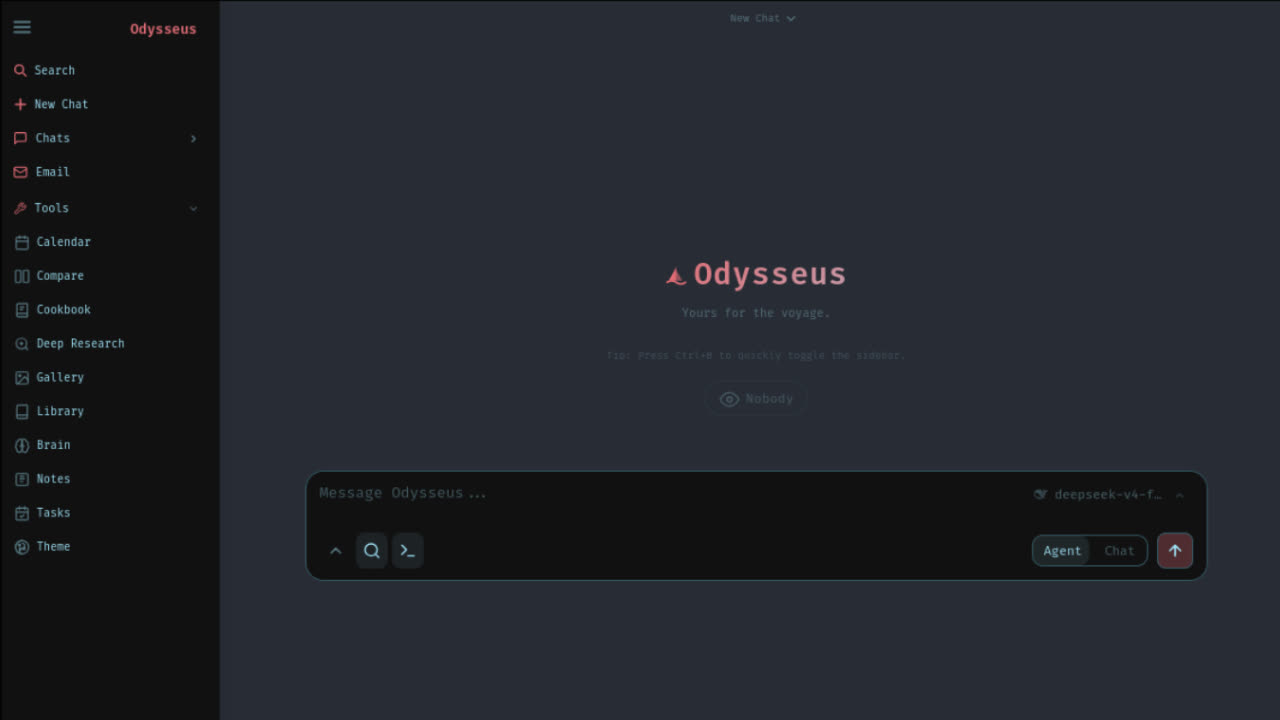
Odysseus AI fits a different user intent. The official Odysseus materials describe a self-hosted AI workspace, not just a chat shell. It includes chat, autonomous agents, tools and MCP, hardware-aware Cookbook model recommendations, Deep Research, Compare, documents, memory, email, and local-first model routing. That makes it attractive when you are not only asking questions, but also trying to run tasks, compare models, write or edit documents, synthesize research, and make your local setup feel like a personal operating layer for AI.
Choose Open WebUI when
You want a focused self hosted AI UI
Use Open WebUI when the main job is fast local or provider-backed chat, RAG over documents, admin controls, model access, plugins, and a clean browser interface for one user or a team.
Choose Odysseus AI when
You want a broader local AI workspace
Use Odysseus AI when your workflow needs agents, research, documents, model fit recommendations, memory, and model comparison beyond the baseline chat window.
In other words, Open WebUI can be the better default for a lightweight local chat portal. Odysseus AI can be the better open webui alternative if your real need is an agent workspace that keeps more of the AI workflow in one self-hosted environment. The rest of this guide breaks down the choice without overstating either side.
Comparison Table
| Decision point | Odysseus AI | Open WebUI | What it means |
|---|---|---|---|
| Primary shape | Local AI workspace with chat, agents, tools, documents, research, and model utilities. | Self-hosted AI platform centered on chat, providers, RAG, plugins, and administration. | Pick workspace depth or chat-platform focus. |
| Local models | Lists Ollama, llama.cpp, vLLM, OpenRouter, OpenAI, and GitHub Copilot style endpoints. | Documents Ollama and OpenAI-compatible API support as core provider paths. | Both can sit in a local model stack. |
| Agents | Official materials emphasize autonomous agents, tools, MCP, web, files, shell, skills, and memory. | Docs include tool calling, plugins, and connecting agents, but the product center is still the web UI platform. | Use Odysseus AI when agent work is central, not occasional. |
| Research and documents | Deep Research, Compare, and document editing are part of the stated workspace scope. | Strong RAG, document library, web search, and provider integrations for chat workflows. | Choose based on whether you want reports and writing workflows or RAG-backed chat. |
| Install path | Clone the official repository, choose Docker/native route, configure model endpoints, then enable the modules you need. | Official docs show Docker, pip, uv, and desktop paths with common localhost ports. | Open WebUI is often easier for first-run validation. |
| Best fit | Power users building a local AI workspace around agents, models, research, and personal data. | Users and teams that need a capable self hosted AI UI for chat, RAG, provider management, and access control. | Both can be correct in the same organization. |
The table also explains why many users test both. A self hosted AI UI can be a narrow model front end, a team portal, a private research bench, or a personal operating layer. Odysseus AI vs Open WebUI becomes clearer when you name the job first: chat portal, local model control, RAG interface, or agent workspace.
Local Model Support
If your main question is whether either tool can work with local models, the answer is broadly yes. Open WebUI has become strongly associated with Ollama because its quick start and docs make Ollama setup visible and approachable. It also supports OpenAI-compatible APIs, which means many provider and local-runtime adapters can fit into the same mental model. That is why people searching for an ollama web ui often land on Open WebUI first: it gives a web interface to model chat without asking the user to design a full workflow system on day one.
Odysseus AI also lists Ollama as a supported endpoint, alongside llama.cpp, vLLM, OpenRouter, OpenAI, and other provider-style routes. The difference is that Odysseus AI treats local model support as one part of a bigger environment. Its Cookbook is especially important for users who are not sure which model fits their hardware. The official materials describe hardware-aware recommendations and serving paths across a model catalog. That is useful when your blocker is not just the UI, but deciding what your laptop or workstation can realistically run.
For local-only users, the best first test is simple. Install Ollama, pull a small model that your machine can run, and connect one interface at a time. If you mainly want stable chat, RAG, and provider management, Open WebUI gives you a direct path. If you want to turn the same model into a broader local AI workspace with agents, documents, memory, comparisons, and research, Odysseus AI is worth testing after the basic endpoint works. Our Odysseus AI Ollama models guide covers the Odysseus side of that model decision.
The mistake to avoid is judging either product from a single large model failure. If a 70B model is too slow on your machine, that does not prove the interface is wrong. It proves the model and hardware pairing is wrong. Use a smaller model first, confirm chat latency, then add documents, RAG, agents, or research workflows after the basic path is stable.
You chose Odysseus. Now let's get you running, not just reading.
Launch Kit tells you exactly where. The bridge between "I chose Odysseus" and "I'm using Odysseus". Not more documentation, but a decision-making kit. The first night should be about exploring, not troubleshooting.
Setup Complexity
Open WebUI usually wins the first-run simplicity test. The official docs provide a Docker command, pip option, uv path, and a desktop route, then point users to localhost. The official GitHub README also highlights Docker and Kubernetes deployment options, with images for Ollama and CUDA scenarios. That does not mean every deployment is trivial. Once users add GPU drivers, remote Ollama endpoints, reverse proxies, SSO, cloud storage, or production volumes, Open WebUI can become a real deployment project. But the starting surface is clear.
Odysseus AI asks the user to think in a wider system. You may need the official GitHub repository, Docker Compose or a native path, model endpoint decisions, optional API credentials, and choices about which modules to use first. That extra surface is not waste if you actually need the workspace. It is overhead if all you wanted was a browser tab for chatting with an Ollama model. This is why our recommendation is intentionally practical: validate your local model with the smallest setup, then graduate to the workspace only when you need workspace features.
For Odysseus AI, use the official GitHub source as the source of truth before running commands. Our Odysseus AI GitHub guide explains how to verify the repository, and the Odysseus AI download guide explains why random installer mirrors are risky. For Open WebUI, use the official docs and official GitHub repository. In both cases, read the commands instead of pasting from a social post.
A good setup checklist is boring by design. Confirm the port, volume, database, model endpoint, auth mode, and network exposure. Keep localhost private until you understand the app. Only add public access after you have authentication, HTTPS, backups, and update discipline. Both tools can be used responsibly; both can be misconfigured if you expose local AI services without a plan.
Workspace Breadth
This is the largest product difference. Open WebUI is feature-rich, but its center of gravity is still the web interface for AI interaction. It gives users a familiar place to chat with models, manage providers, upload or retrieve documents, use RAG, add tools, configure plugins, and support multiple users. That is already enough for many homes, labs, and teams. A polished self hosted AI UI should not be dismissed just because it is focused. Focus is often the feature.
Odysseus AI is more ambitious as a local AI workspace. The official project materials list chat, autonomous agents, tools and MCP, Cookbook, Deep Research, Compare, documents, memory, email, notes, tasks, calendar, and mobile access. A user comparing Odysseus AI vs Open WebUI should therefore ask whether they need a workspace or a portal. If you want an agent to inspect files, use tools, remember context, help with research, and then support document editing, Odysseus AI maps more closely to that pattern.
The breadth has a cost. A broader workspace has more concepts, more places to configure, and more ways for a beginner to get lost. A focused Open WebUI deployment can be easier to reason about because the main object is the chat experience and its supporting systems. This is why the best answer is not universal. It is a workflow decision.
Think of Open WebUI as the strong default for a shared model cockpit. Think of Odysseus AI as a personal or power-user cockpit that also wants task execution, research synthesis, model selection, and writing workflows. That distinction makes the open webui alternative question more useful: alternative for what exact job?
Privacy and Network Boundary
Both projects are attractive because they can be self-hosted. That does not mean every configuration is private by default. Privacy is a boundary you create through endpoint choices, network exposure, storage decisions, and update habits. A local Ollama model used from localhost has a different risk profile than a setup that sends prompts to a remote API, pulls web search results, imports cloud files, or exposes the app to the internet.
Open WebUI documents provider-agnostic local and cloud model support, RAG, plugins, web search, and enterprise integrations. Those are useful capabilities, but each connector should be understood. Odysseus AI similarly supports local and API model routes, tools, MCP, web, files, shell, memory, email, and research workflows. Those features are powerful precisely because they can touch data. Treat permissions as a design step, not a cleanup step.
For a privacy-first setup, start with a local-only model, keep the service on your machine or LAN, avoid cloud API keys until you need them, and write down which modules are allowed to reach the network. If you add agents, shell, file access, or web tools, use allowlists and test with non-sensitive data first. If you add a team, test user permissions and backups. The safest comparison is not Odysseus AI vs Open WebUI in the abstract; it is your exact deployment boundary.
Who Should Choose Which
Choose Open WebUI if you want the fastest route to a capable self hosted AI UI. It is especially attractive for users who already know they want Ollama chat in a browser, OpenAI-compatible provider routing, document RAG, plugin expansion, voice or web search features, and role-based access for more than one user. If your team asks for a stable chat portal and admin-friendly deployment, Open WebUI should be on the shortlist.
Choose Odysseus AI if your search intent is bigger than chat. If you keep asking for agents, model fit recommendations, deep research reports, side-by-side model comparison, document writing assistance, persistent memory, and local-first control, Odysseus AI is closer to the workspace you are imagining. The tool has more surface, but the surface exists because the job is broader.
Beginners should be honest about tolerance for setup. If you have never run Docker, pulled an Ollama model, or configured a local service, Open WebUI may be the easier first confidence win. After you understand ports, endpoints, model names, and volumes, it becomes easier to judge Odysseus AI on its actual strengths rather than on setup friction. Our how to run Odysseus and Odysseus setup pages are built for that transition.
Advanced users should judge by workflow consolidation. If you already run several model endpoints and keep separate tools for chat, research, notes, tasks, writing, and local scripts, Odysseus AI may reduce tool switching. If your existing stack already works and the only missing piece is a friendlier local chat layer, Open WebUI may be enough.
Switching or Combining Path
You do not have to make the decision permanent. Many local AI users keep a focused UI and a workspace side by side while they learn. Start with one local model runtime, often Ollama, then connect Open WebUI for chat validation. Once the model path is stable, test Odysseus AI with the same or similar endpoint. This keeps the model variable controlled while you compare workflow differences.
A clean test plan is better than a debate. Use the same three prompts in both tools: one plain chat question, one document or retrieval task, and one multi-step work task. Then score setup time, answer quality, friction, data boundary clarity, and how many extra apps you still need. The winner is the tool that makes your real weekly work easier, not the one with the longest feature list.
If you switch from Open WebUI to Odysseus AI, document your current providers, model names, API keys, volumes, and RAG expectations first. If you switch from Odysseus AI to Open WebUI, decide which workspace features you are giving up and whether another tool will handle them. If you combine them, keep ports, data directories, and model endpoints separate enough that troubleshooting remains simple.
The best long-term setup may be mixed: Open WebUI as a reliable chat portal for shared access, and Odysseus AI as the agent workspace for deeper personal work. That is not duplication if the jobs are different. It is only duplication if both tools are asked to do the same task every day.
Official Sources Used
This comparison is based on official or project-controlled sources rather than recycled social summaries. For Odysseus AI, verify the project through the official GitHub repository and the official GitHub Pages site. For Open WebUI, verify features and installation through the official documentation and the official GitHub repository. When either project changes, trust those sources over old videos, mirrors, or package pages.
FAQ
Is Odysseus AI better than Open WebUI?
It depends on the job. Open WebUI is a strong self hosted AI UI for fast chat, Ollama access, RAG, plugins, users, and provider connections. Odysseus AI is a better fit when the job needs a broader local AI workspace with agents, Cookbook model selection, documents, memory, deep research, and compare workflows in one app.
Can Odysseus AI and Open WebUI both use Ollama?
Yes. Odysseus AI lists Ollama among supported model endpoints, and Open WebUI documents Ollama support as a core provider path. The right choice is less about whether Ollama works and more about whether you want a focused ollama web ui or a wider agent workspace.
Is Open WebUI an Odysseus AI alternative?
Open WebUI can be an open webui alternative for users who mostly want browser-based model chat, RAG, provider configuration, and team-friendly administration. It is not a one-to-one replacement for Odysseus features such as Cookbook recommendations, autonomous agent task execution, documents, memory, and deep research.
Which one is easier to install?
Open WebUI usually has the simpler first-run story because the official docs show Docker, pip, uv, and desktop paths. Odysseus AI is still self-hosted, but the broader workspace means you should plan model endpoints, optional API keys, local services, and which modules you actually need.
Which should privacy-focused users choose?
Both can be deployed locally, but privacy depends on configuration. A local Ollama-only setup keeps model requests on your machine or network. Any OpenAI-compatible API, cloud storage connector, web search provider, or external tool changes the boundary, so document which endpoints are allowed before regular use.
For most readers, the final Odysseus AI vs Open WebUI answer is simple: start with the smallest tool that satisfies the job, then expand only when the workflow demands it. Use Open WebUI for a polished self hosted AI UI. Use Odysseus AI when the job is a local AI workspace with an agent workspace, research, documents, and model workflow depth.